InventoryPath Order Exports

Supplier files for Shopify teams

Stop rebuilding supplier spreadsheets.

Choose a supplier, select the columns they need and preview the rows. Schedule CSV or Excel files from eligible Shopify order lines, with verified supplier access for private downloads.

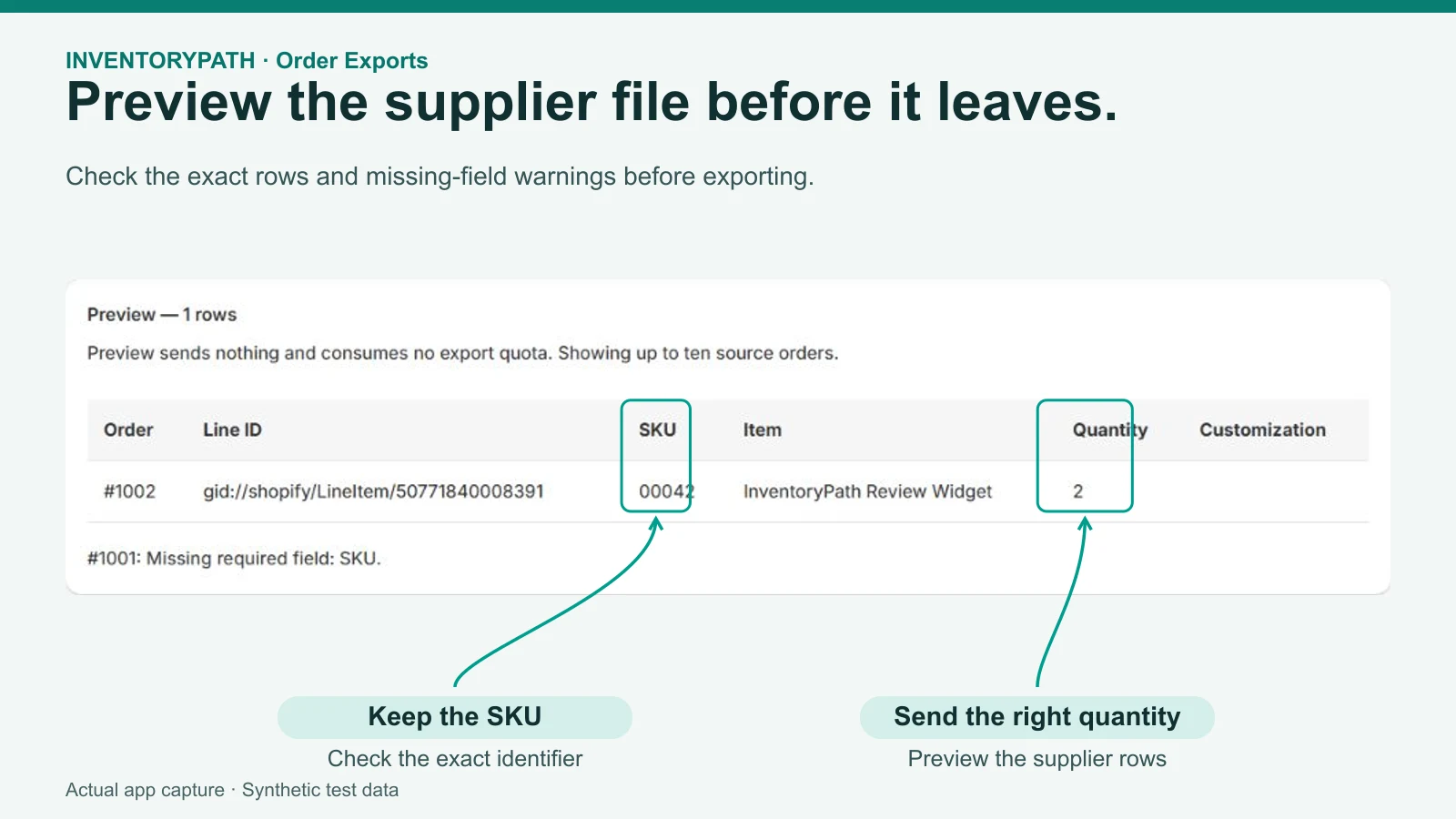
Supplier preview with SKU, quantity and missing-field warning. Actual app screen with synthetic demonstration data.
Preview the supplier's rows before you activate the workflow. Actual app screen with synthetic demonstration data.

Agree on the supplier file before the next run

Start with one exact vendor, the SKU, an eligible quantity and the supported customization fields the supplier needs.

A SKU such as 00127-BL should stay text, with quantity and personalization in distinct columns. Review the actual preview before activation.

Illustrative layout. Shopify buyer name, email, phone and address columns are unavailable. Customization values can still contain personal information. A generated file does not establish fulfillment.

Free to download, with no email required. This is an editable text worksheet for people, not a file to upload to the app or a native app export.

A clearer way to get the job done

Give suppliers the fields they need

Select supported SKU, quantity and customization fields, then check the actual rows before activation.

Build a repeatable supplier routine

Keep a workflow for an exact vendor and choose a daily or eligible hourly schedule.

Keep files behind verified access

Suppliers verify their inbox before downloading from a private access link. Your team retains control of fulfillment.

How it works

  1. Step 1

    Choose the vendor and columns

    Select the eligible order lines and supported fields for this supplier.

  2. Step 2

    Inspect the preview

    Review the supplier file before enabling scheduled generation.

  3. Step 3

    Verify and schedule

    Verify the supplier inbox and activate the workflow intentionally.

Read the full setup guide

Your first useful result

Prepare one supplier-ready file and check the rows before scheduling it.

  • Choose an exact vendor and the supported columns your supplier needs.
  • Preview the matching order rows and check the file format.
  • Verify the supplier inbox, activate the workflow and review the generated file.
Follow the setup guide

Choose your plan

Starter

USD 4 per month

14-day trial

  • 3 active daily workflows
  • 1,000 unique exported orders per Shopify billing window
  • 20,000 rows and 300 file batches
Install from Shopify

Growth

USD 19.99 per month

14-day trial

  • 10 active workflows, up to 2 hourly
  • 5,000 unique exported orders per Shopify billing window
  • 100,000 rows and 2,000 file batches
Install from Shopify

No automatic overage charges. Shopify's confirmation screen controls actual pricing, trial eligibility and taxes. Review the full product scope and allowance rules.

Before you get started

Does it change orders or inventory?

No. Order Exports reads order data without changing orders, inventory, fulfillment, checkout or themes.

Does it export old orders or prove supplier receipt?

New-item workflows start with future eligible orders. Snapshot reports use a bounded recent-order window; historical backfill is unavailable. A generated file or accepted notice does not prove supplier receipt or fulfillment.

The in-app guide works without an email subscription. Optional setup tips require store-owner consent and inbox verification. Setup and email preferences · Privacy details

Inside InventoryPath Order Exports

Actual app screens with synthetic demonstration data. Sample amounts are not merchant results or guaranteed outcomes. Select an image to view it at full size.

Supplier preview with SKU, quantity and missing-field warning. Actual app screen with synthetic demonstration data.
Preview the supplier file before it leaves. · Synthetic demonstration
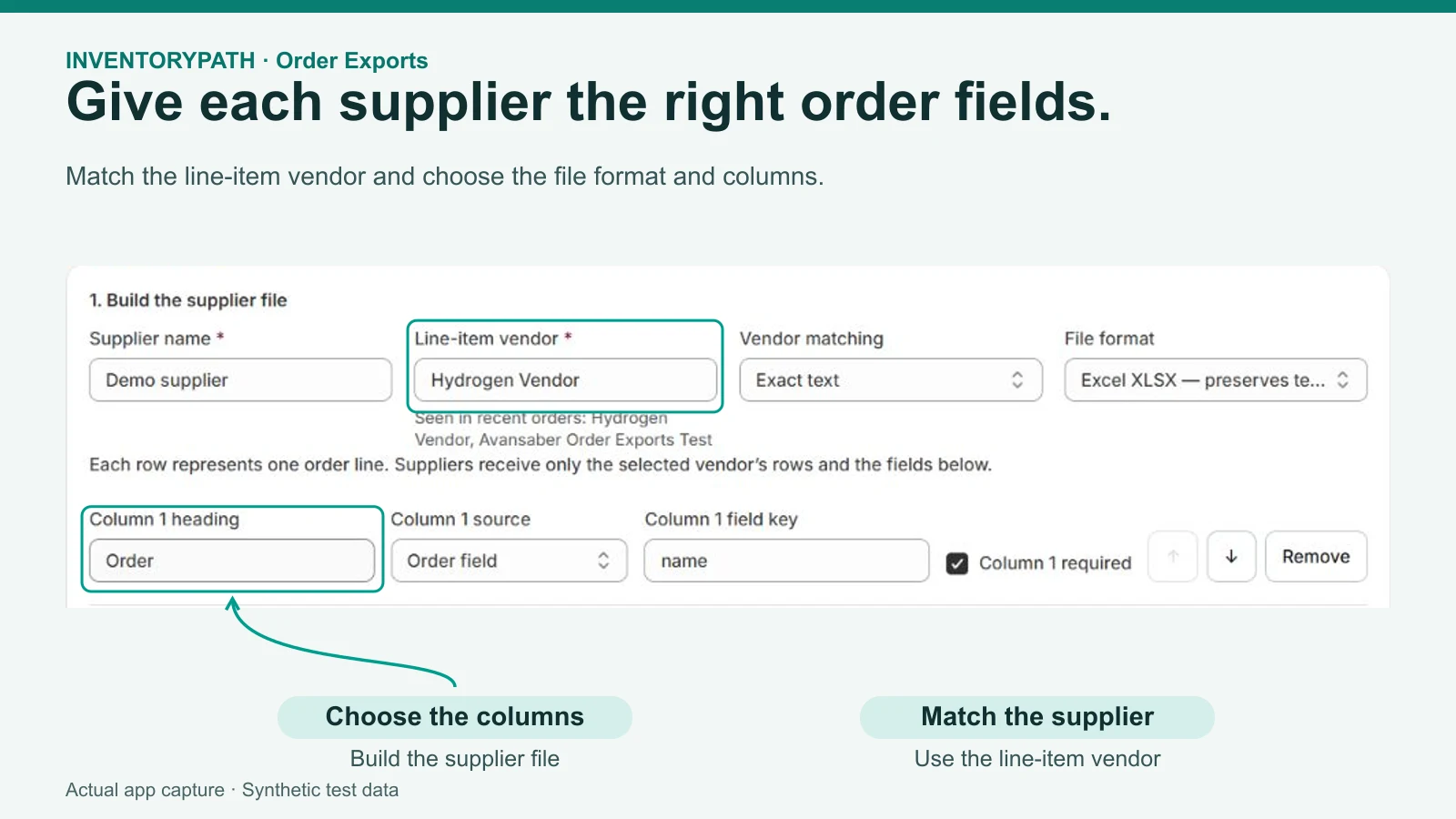
Choose the supplier vendor, file format and ordered columns. Actual app screen with synthetic demonstration data.
Give each supplier the right order fields. · Synthetic demonstration
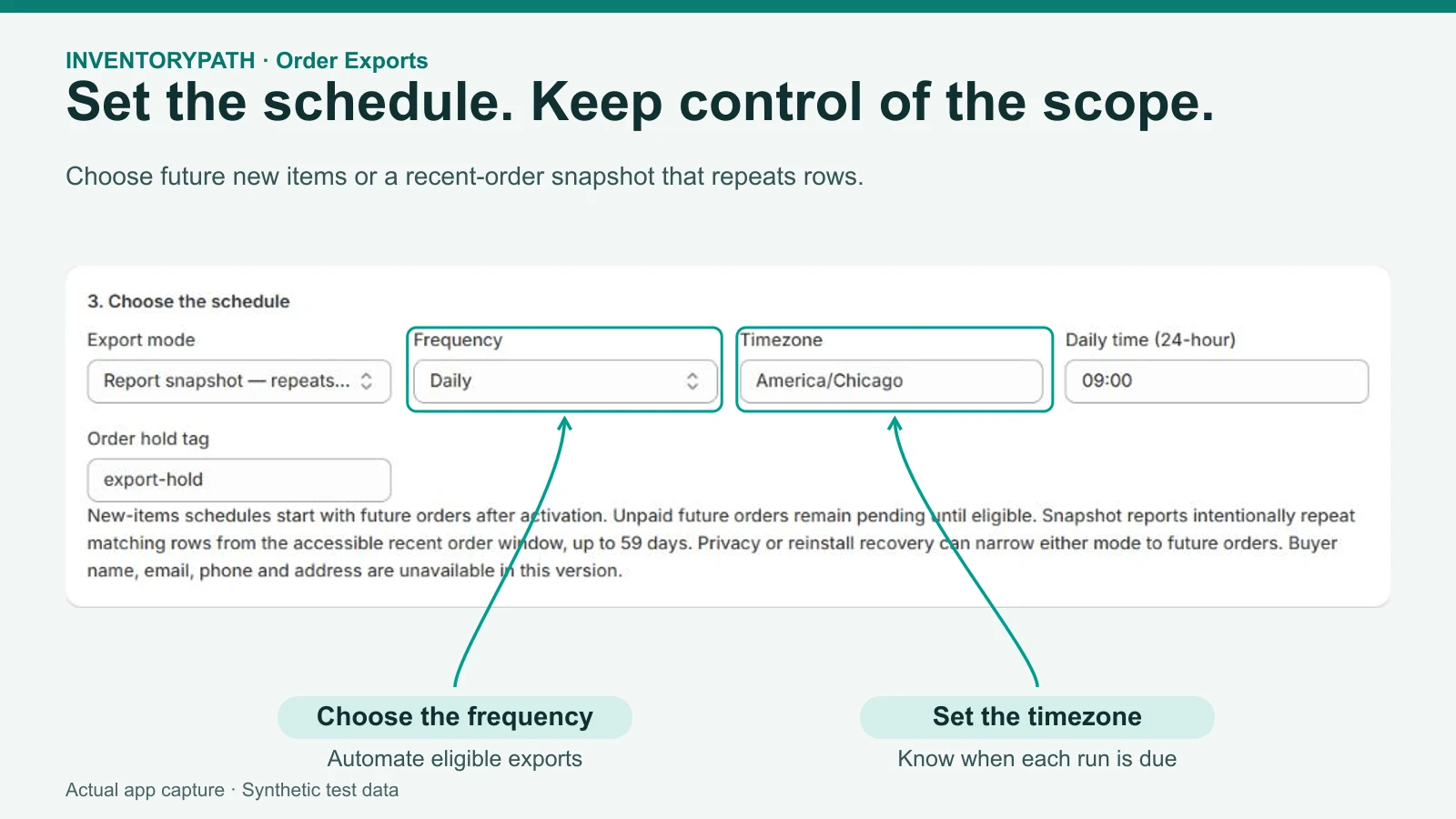
Export mode, daily schedule, timezone and order hold tag. Actual app screen with synthetic demonstration data.
Set the schedule. Keep control of the scope. · Synthetic demonstration
Detailed product scope and limits

From order lines to supplier files

Create a workflow for one supplier, select the supported fields they need, and preview the output. Scheduled files use verified supplier access, with a fresh inbox check before download.

Choose your supplier

Select an exact line-item vendor and the eligible order lines for that supplier.

Choose your columns

Use supported SKU, quantity, personalization, order attribute and selected order metafield fields. Preview the rows before activation.

Schedule verified access

Verify the supplier inbox, then activate a daily or eligible hourly schedule. Suppliers verify their inbox before downloading from a private access link.

What to expect

A focused export workflow

  • New-item workflows start with future eligible orders after activation. Snapshot reports repeat matching recent rows within a rolling 59-day source horizon and a 5,000-order scan cap. Historical backfill is unavailable.
  • CSV or Excel files, with selected supported columns and customization values.
  • Private supplier access links with inbox verification. Files expire after seven days. Each file is limited to 10,000 rows, 20 MiB of selected field text and 20 MiB total file size.

Keep control of your orders

  • The app reads orders without changing orders, inventory, fulfillment, checkout or themes.
  • Shopify buyer name, email, phone and address columns are unavailable. Selected customization and attribute values can still contain personal information; share only what your authorized supplier needs.
  • Your team stays in control of fulfillment and supplier follow-up.

Shopify plans

Monthly pricing, with a 14-day trial on either plan. Install from the Shopify App Store.

Starter

$4 USD per month

Limits per Shopify billing window

  • 3 active daily workflows
  • 1,000 unique exported orders
  • 20,000 rows
  • 300 file batches

Growth

$19.99 USD per month

Limits per Shopify billing window

  • 10 active workflows, including at most 2 hourly
  • 5,000 unique exported orders
  • 100,000 rows
  • 2,000 file batches

Shopify handles subscription approval, billing and changes. There are no usage-based overage charges. File generation pauses when the first applicable quota is reached. A batch means one generated supplier file.

Questions about Order Exports? Contact [email protected].

InventoryPath, a brand of AvanSaber Inc. AvanSaber Inc. operates Order Exports.

Optional merchant setup tips

Optional setup tips are available. The guide works without email enrollment. Only the authenticated store owner can opt in, and the chosen help inbox must be verified.

Setup and optional tips inside the Shopify app provides a guide based on your store's recorded progress, without requiring email enrollment. The store owner may separately choose and verify a merchant help inbox to request up to four tips over fourteen days. Staff can use the guide without subscribing. No contacts are imported automatically, and invitations do not enroll their recipients.

Optional tips come from Inventory App at [email protected] through Zoho Campaigns, with shared portfolio limits and app-specific/stop-all preferences. Read the guide and privacy details. Product support remains [email protected].

Make the next supplier run a repeatable workflow.

Install from Shopify

InventoryPath is a brand of AvanSaber Inc. Product questions: [email protected].